
遇到了Can not connect to the Service chromedriver的问题,网上一查发现是localhost无法解析的问题
Can not connect to the Service chromedriver的解决方法
尝试ping了一下localhost,返回:
1 | localhost:未知的名称或服务 |
改成英文版ping了一下locaohost,返回
1 | localhost name or service not known |
去/etc/hosts里面查了一下,发现文件正常:
1 | 127.0.0.1 localhost linuxdeploy |
尝试ping了下fuck,发现也是返回未知的名称或服务。
但是ping www.baidu.com却可以ping通。
之后查了一下linux下dns查询的原理。
按照这篇文章(https://zhuanlan.zhihu.com/p/42898476
)的说法,使用strace能看到dns查询的时候系统读取了/etc/hosts文件比如:
1 | open("/etc/hosts", O_RDONLY|O_CLOEXEC) = 4 |
之后使用命令 strace -f ping -c1 localhost调试这个程序的系统调用,结果并没有发现系统读取了发现了/etc/hosts,反而发现这样一个报错:
1 | connect(5, {sa_family=AF_UNIX, sun_path="/var/run/nscd/socket"}, 110) = -1 ENOENT (No such file or directory) |
注意到其中读取了/etc/nsswitch.conf文件但是却报了错,表示找不到这个文件。
去系统里看了一下,果然没有这个文件。
我这个系统是debian系统,去debian的man page上面查了查,这个文件应该是自带的。
又从这里(https://blog.51cto.com/wujunfeng/1104498)了解到:
/etc/nsswitch.conf 其中的hosts:选项指定了系统dns的查询方式,比如:
1 | hosts: dns files |
看来或许是这个文件缺失导致的localhost无法解析。
使用以下命令搜索了一下系统中有没有软件包带有nsswitch.conf 这个文件:
1 | sudo apt-get install apt-file |
发现glibc-source: /usr/src/glibc/debian/local/etc/nsswitch.conf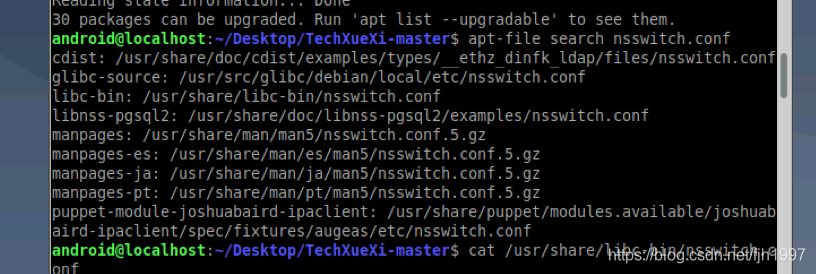
于是直接把这个复制过去。
1 | cp /usr/src/glibc/debian/local/etc/nsswitch.conf /etc/ |
之后尝试ping localhost就可以通了。

说些什么吧!